
Contact Us
Contact Us
+91-7708009900
 Accredited Registrar
Accredited Registrar
Accredited Registrar
How to map specific apps to tomcat & all other requests for apache?
Follow the below steps to map specific apps to tomcat and request for apache.
Step 1: Login to your NGASI panel.
Step 2: Then click the Webserver and Hosting Manager Configuration icon in the home page. 
Step 3: Now the select the Web Server Path Map.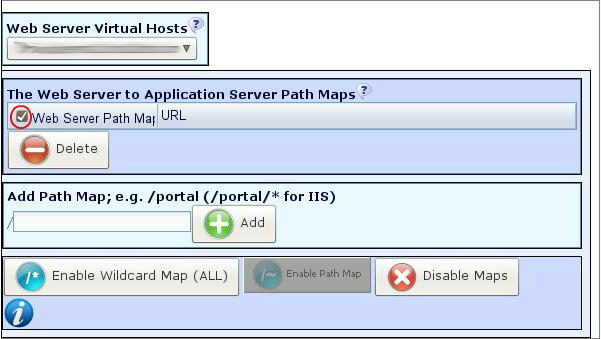
Step 4: In the new page, enter the name of the application in the Add Path Map text box.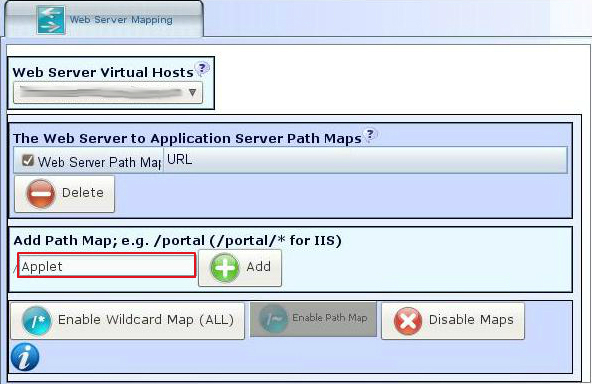
Step 5: Then click the Add button.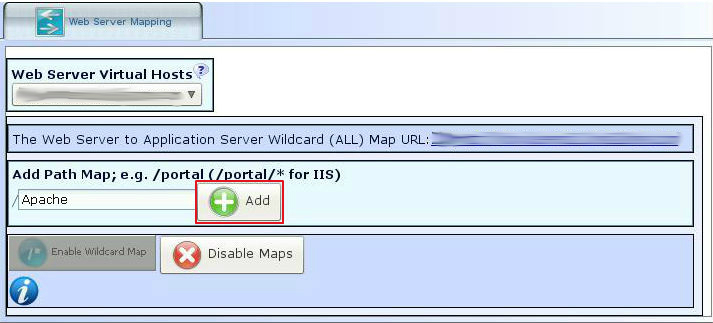
Step 6: Now click the Enable Wild Card button.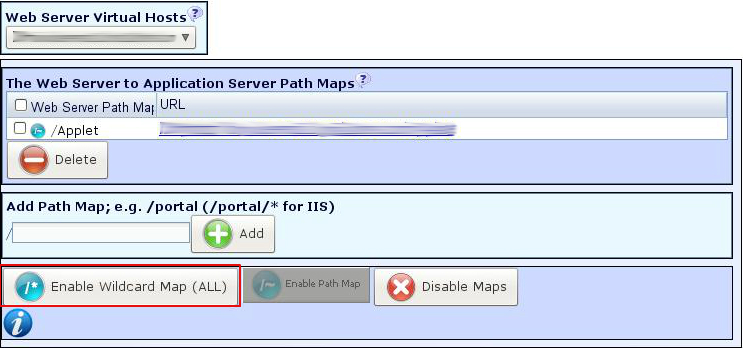
Step 7: Thus the user can get the application served from tomcat and all other requests are served directly from apache.
|
Not at all
helpful Not much
helpful Some what
helpful Very
helpful Extremely
helpful | ||||||||
What could be better? (Optional)
X
Not related to my issue
Too complicated explanations
Too much information
Incorrect information
Unclear information
Incomplete information
Too old information
Do you have any other feedback about this faq ? 1000
| ||||||||
 ]
]
